1.前提工作
- github(本文针对github,其他如gitee类似)
- node.js、npm
- git客户端
- hexo(本文会介绍怎么安装)
2.搭建博客项目(h5)
- 创建github仓库
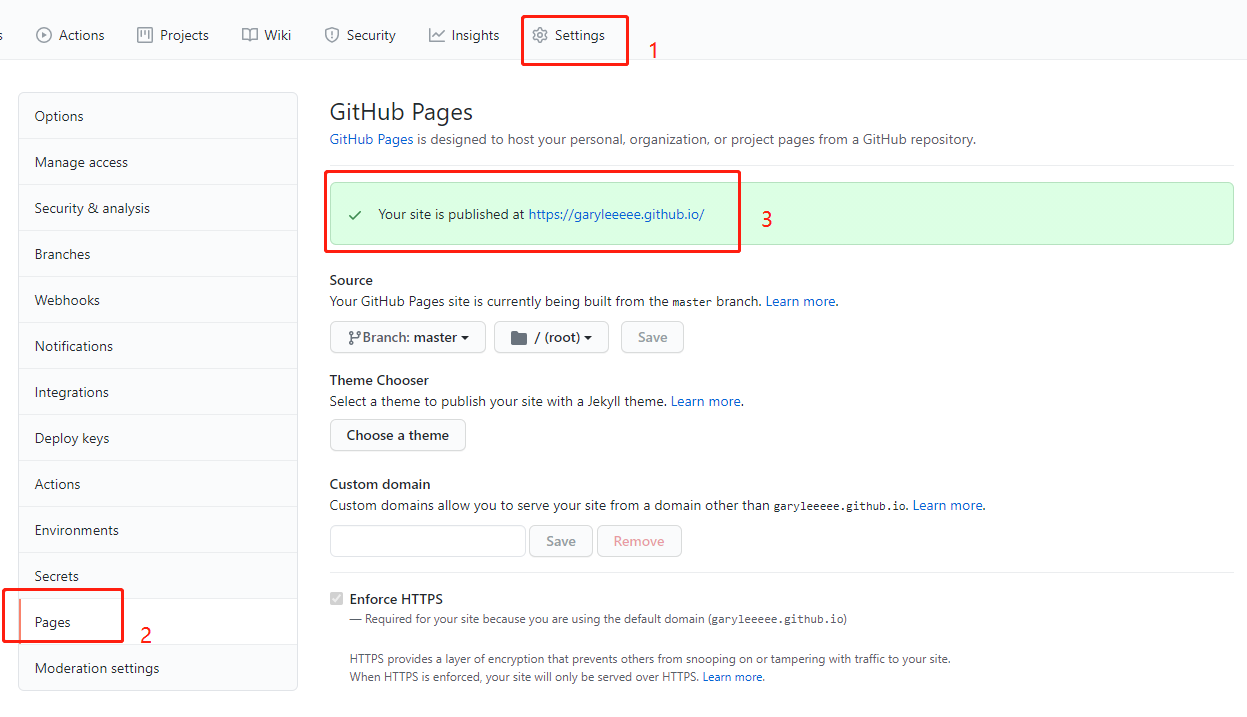
新建一个名为 {用户名}.github.io的仓库 - 在settings-pages可以看到博客部署的地址
3.如何使用hexo
3.1 install(安装)
npm install -g hexo
3.2 hexo init(初始化)
随便找一个目录放代码(后面发博客内容等需要修改) 如d:/hexo
并初始化为hexo项目cd d:/hexohexo init
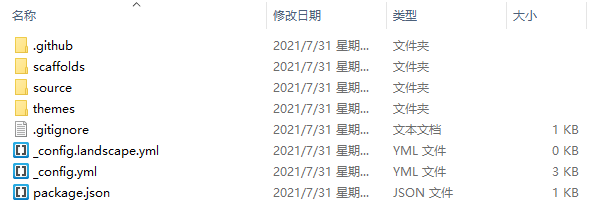
这时候会自动生成一些文件
3.3 hexo g(生成)
hexo g是hexo generate的缩写,用于在public文件夹生成最终的文件(.md文件会被生成.html文件)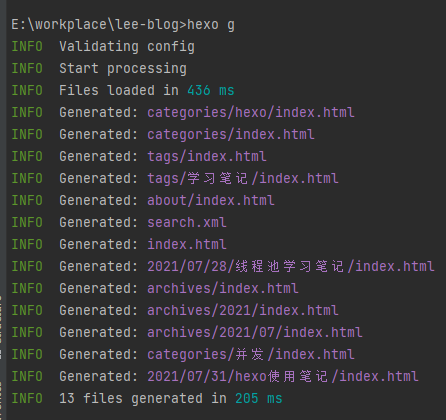
3.4 hexo s(启动服务)
hexo s是hexo server的缩写,用于本地启动服务,可以通过http://localhost:4000访问
3.5 重要目录/文件的作用
| 文件夹 | 作用 |
|---|---|
| source | 存放静态文件的文件夹(包括md、图片等) |
| themes | 模板库(可以网上下载到这里) |
| _config.yml | 全局配置(如username等) |
4.使用主题并写博客
一般我们下载网上的主题,就可以直接修改配置文件(_config.yml)来自定义页面内容
- 找一个主题并下载到
/themes目录下
比如我的主题是https://github.com/blinkfox/hexo-theme-matery - 修改
_config.yml的theme: landscape为theme: matery
5.如何部署到远程{username.github.io}
5.1 配置git账户信息
deploy:
type: git
repository: git@github.com:$${GitHub用户名}/${仓库名}.git
branch: master
5.2 安装deployer插件
npm install hexo-deployer-git --save
如果没安装的话hexo d一般会报错”Deployer not found: github”或者”Deployer not found: git”
5.3 hexo d(部署)
hexo d是hexo doploy的缩写,用来部署服务到远程
6.如何写博客
6.1 hexo new xxx(新建博客)
通过hexo new ‘my-first-blog’即可创建一个名字为my-first-blog的微博文件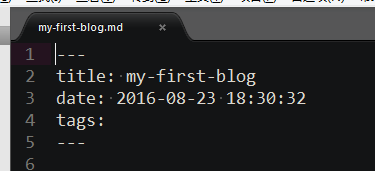
6.2 hexo new page xxx(新建页面)
与new不同的是他是生成一个页面,并不会以一个博客显示在目录中
6.3 博客配置
| 属性 | 作用 |
|---|---|
| title | 博客名 |
| date | 创建日期 |
| tags | 标签名(后面有讲) |
| categories | 分类名(后面有讲) |
7.常见问题
7.1 matery主题如果没有tags/categories/about页面?
新增标签tags页面(categories/about类似)tags页是用来展示所有标签的页面,如果在你的博客source目录下还没有tags/index.md文件,那么你就需要新建一个,命令如下:
hexo new page “tags”
并且在生成的md文件中加上type和layout,如下
title: tags
date: 2021-07-31 16:40:30
type: “tags”
layout: “tags”
7.2 部署远程后没更新
删除本地.deploy_git目录,重新执行hexo d -g
7.3 如何上传本地图片
在source目录新建一个图片目录(如images),然后在博客里引用(参考https://zhuanlan.zhihu.com/p/104996801)
7.4 如何代码格式化


7.5 部署异常(鉴权失败)
执行指令hexo d -g报错
On branch master
nothing to commit, working tree clean
@@@@@@@@@@@@@@@@@@@@@@@@@@@@@@@@@@@@@@@@@@@@@@@@@@@@@@@@@@@
@    WARNING: REMOTE HOST IDENTIFICATION HAS CHANGED!     @
@@@@@@@@@@@@@@@@@@@@@@@@@@@@@@@@@@@@@@@@@@@@@@@@@@@@@@@@@@@
IT IS POSSIBLE THAT SOMEONE IS DOING SOMETHING NASTY!
Someone could be eavesdropping on you right now (man-in-the-middle attack)!
It is also possible that a host key has just been changed.
The fingerprint for the RSA key sent by the remote host is
SHA256:uNiVztksCsDhcc0u9e8BujQXVUpKZIDTMczCvj3tD2s.
Please contact your system administrator.
Add correct host key in /c/Users/Administrator/.ssh/known_hosts to get rid of this message.
Offending RSA key in /c/Users/Administrator/.ssh/known_hosts:1
RSA host key for github.com has changed and you have requested strict checking.
Host key verification failed.
fatal: Could not read from remote repository.

Please make sure you have the correct access rights
and the repository exists.
FATAL {
  err: Error: Spawn failed
      at ChildProcess.<anonymous> (E:\workplace\lee-blog\node_modules\hexo-util\lib\spawn.js:51:21)
      at ChildProcess.emit (node:events:513:28)
      at cp.emit (E:\workplace\lee-blog\node_modules\cross-spawn\lib\enoent.js:34:29)
      at ChildProcess._handle.onexit (node:internal/child_process:291:12) {
    code: 128
  }
} Something's wrong. Maybe you can find the solution here: %s https://hexo.io/docs/troubleshooting.
检查了本地ssh和远程github的ssh匹配,排除不匹配的可能性
执行ssh -T git@github.com,验证主机是否与github网站之间的ssh通信是否连接成功
Administrator@243Z59L59Q55VQT MINGW64 /e/workplace/lee-blog (master)
$ ssh -T git@github.com
@@@@@@@@@@@@@@@@@@@@@@@@@@@@@@@@@@@@@@@@@@@@@@@@@@@@@@@@@@@
@    WARNING: REMOTE HOST IDENTIFICATION HAS CHANGED!     @
@@@@@@@@@@@@@@@@@@@@@@@@@@@@@@@@@@@@@@@@@@@@@@@@@@@@@@@@@@@
IT IS POSSIBLE THAT SOMEONE IS DOING SOMETHING NASTY!
Someone could be eavesdropping on you right now (man-in-the-middle attack)!
It is also possible that a host key has just been changed.
The fingerprint for the RSA key sent by the remote host is
SHA256:uNiVztksCsDhcc0u9e8BujQXVUpKZIDTMczCvj3tD2s.
Please contact your system administrator.
Add correct host key in /c/Users/Administrator/.ssh/known_hosts to get rid of this message.
Offending RSA key in /c/Users/Administrator/.ssh/known_hosts:1
RSA host key for github.com has changed and you have requested strict checking.
Host key verification failed.发现known_hosts文件异常,尝试删除文件,并重新生成
Administrator@243Z59L59Q55VQT MINGW64 /e/workplace/lee-blog (master)
$ ssh -T git@github.com
The authenticity of host 'github.com (20.205.243.166)' can't be established.
ECDSA key fingerprint is SHA256:p2QAMXNIC1TJYWeIOttrVc98/R1BUFWu3/LiyKgUfQM.
Are you sure you want to continue connecting (yes/no)? y
Please type 'yes' or 'no': yes
Warning: Permanently added 'github.com,20.205.243.166' (ECDSA) to the list of known hosts.
Hi GaryLeeeee! You've successfully authenticated, but GitHub does not provide shell access.

Administrator@243Z59L59Q55VQT MINGW64 /e/workplace/lee-blog (master)
$ ssh -T git@github.com
Hi GaryLeeeee! You've successfully authenticated, but GitHub does not provide shell access.可以看到校验成功了,重新执行hexo d -g
Administrator@243Z59L59Q55VQT MINGW64 /e/workplace/lee-blog (master)
$ hexo d -g
INFO  Validating config
INFO  Start processing
INFO  Files loaded in 640 ms

...

On branch master
nothing to commit, working tree clean
Counting objects: 1167, done.
Delta compression using up to 4 threads.
Compressing objects: 100% (738/738), done.
Writing objects: 100% (1167/1167), 7.87 MiB | 254.00 KiB/s, done.
Total 1167 (delta 397), reused 0 (delta 0)
remote: Resolving deltas: 100% (397/397), done.
To github.com:GaryLeeeee/${仓库名}.git
 + 06ab1b8...af6b499 HEAD -> master (forced update)
Branch master set up to track remote branch master from git@github.com:GaryLeeeee/${仓库名}.git.
INFO  Deploy done: git
搞定!
7.6 新环境hexo命令无法使用?
D:\code-r\lee-blog> hexo
ERROR Cannot find module 'hexo' from 'D:\code-respostory\lee-blog'
ERROR Local hexo loading failed in D:\code-respostory\lee-blog
ERROR Try running: 'rm -rf node_modules && npm install --force'原因是没有下载对应的依赖,直接在项目下执行npm install后重试即可
7.7 部署异常(鉴权失败)2.0
执行hexo d -g时报错:
git@github.com: Permission denied (publickey).
fatal: Could not read from remote repository.

Please make sure you have the correct access rights
and the repository exists.
这种一般不是Hexo生成问题,而是部署到GitHub时SSH鉴权失败。
先检查_config.yml中的部署地址:
deploy:
  type: git
  repository: git@github.com:${GitHub用户名}/${仓库名}.git
branch: master如果repository是git@github.com:xxx/xxx.git,说明走的是SSH方式,需要本机SSH key能登录GitHub。
7.7.1 先测试GitHub SSH是否可用
ssh -T git@github.com如果仍然报:
git@github.com: Permission denied (publickey).说明当前本机没有可被GitHub识别的SSH key,或者这个key没有目标仓库权限。
7.7.2 如果本机已有GitLab的key,不要覆盖
如果~/.ssh/id_ed25519.pub已经给GitLab或公司代码库使用,不建议直接复用或覆盖。
可以单独给GitHub生成一把新的key:
ssh-keygen -t ed25519 -C "你的GitHub邮箱" -f ~/.ssh/id_ed25519_github这里重点是-f ~/.ssh/id_ed25519_github,它会生成:
~/.ssh/id_ed25519_github
~/.ssh/id_ed25519_github.pub
不会覆盖原来的:
~/.ssh/id_ed25519
~/.ssh/id_ed25519.pub
7.7.3 把GitHub专用公钥添加到GitHub
查看公钥:
cat ~/.ssh/id_ed25519_github.pub复制输出内容,添加到GitHub:
GitHub -> Settings -> SSH and GPG keys -> New SSH key7.7.4 配置GitHub使用专用key
如果~/.ssh/config不存在,可以新建:
touch ~/.ssh/config
chmod 600 ~/.ssh/config
只配置GitHub即可,不影响其他默认GitLab配置:
Host github.com
  HostName github.com
  User git
  IdentityFile ~/.ssh/id_ed25519_github
IdentitiesOnly yes含义是:访问github.com时强制使用id_ed25519_github这把key。
其他GitLab地址没有配置的话,会继续走SSH默认逻辑,比如默认尝试:
~/.ssh/id_rsa
~/.ssh/id_ed25519
7.7.5 重新测试
ssh -T git@github.com正常会看到类似:
Hi GaryLeeeee! You've successfully authenticated, but GitHub does not provide shell access.这时候再重新执行:
hexo d -g如果仍然失败,再确认:
- GitHub公钥是否添加到了正确账号
- 当前账号是否有
xxx.github.io仓库权限 _config.yml里的repository仓库地址是否写对- 目标仓库是否存在
7.8 hexo d使用了global的Git账号
执行hexo d或hexo d -g部署成功了,但是GitHub Pages仓库里的提交人不是自己想要的账号,而是本机global配置的账号。
可以先看一下当前global配置:
git config --global --get user.name
git config --global --get user.email
再看一下当前博客源码仓库的local配置:
git config --local --get user.name
git config --local --get user.email如果源码仓库local配置是对的,但hexo d还是用了global账号,原因一般是:hexo-deployer-git实际会在.deploy_git目录里提交部署产物。
也就是说,部署提交不是在当前源码仓库里提交,而是在.deploy_git这个临时Git仓库里提交。如果.deploy_git没有单独配置user.name和user.email,就会回退使用global配置。
7.8.1 推荐方式:在_config.yml里配置部署账号
hexo-deployer-git支持在deploy下配置name和email:
deploy:
  type: git
  repository: git@github.com:${GitHub用户名}/${仓库名}.git
  branch: master
  name: ${GitHub用户名}
email: ${Git提交邮箱}这样后续.deploy_git重新初始化时,也会使用这里配置的账号。
7.8.2 如果.deploy_git已经存在,需要同步改local配置
如果.deploy_git目录已经存在,可能之前已经初始化过,此时可以直接给它设置local账号:
cd .deploy_git
git config user.name ${GitHub用户名}
git config user.email ${Git提交邮箱}
确认配置:
git config --local --get user.name
git config --local --get user.email
正常输出:
${GitHub用户名}
${Git提交邮箱}
然后回到项目根目录重新部署:
cd ..
hexo d -g
7.8.3 也可以删除.deploy_git后重新部署
如果不想手动改.deploy_git配置,也可以删除.deploy_git目录,让Hexo下次部署时重新初始化:
rm -rf .deploy_git
hexo d -g前提是_config.yml里已经配置了deploy.name和deploy.email。
7.8.4 为什么不建议直接改global?
因为本机可能有多个Git账号,比如:
- 公司GitLab账号
- 个人GitHub账号
- 其他项目账号
直接改global会影响其他目录。更推荐按项目或按部署工具单独配置,避免不同仓库提交人混乱。